

Design Your App's Database Before You Build the UI: A Lesson From My Scars
[DRAFT IN PROGRESS. DO NOT PUBLISH]
Ah, the siren song of the UI! The vibrant colors, the slick animations, the immediate gratification of seeing something work... It's a powerful lure for any burgeoning app developer, especially citizen developers eager to bring their ideas to life. And I, like many, fell for it, hook, line, and sinker, in my early days.
I'd dive headfirst into designing the screens, dragging and dropping elements, making things look pretty. "The data? Oh, that'll figure itself out," I'd tell myself, blissfully unaware of the tangled web of frustration I was weaving. The result? Apps that looked great on the surface but crumbled under the weight of real-world data, requiring painful, time-consuming overhauls. My enthusiasm often ended up in a heap of abandoned projects and wasted effort.
It was a tough lesson, learned through the crucible of countless late nights and the bitter taste of regret. But it taught me this undeniable truth: designing your app's database before you touch the UI is not just a good idea, it's an absolute necessity. It's the sturdy foundation upon which your entire app will stand, or, if ignored, the quicksand into which it will sink.
So, let's learn from my past self's missteps and embrace a simpler, more robust approach. Forget the technical jargon for a moment; we're going to think in terms of "entities and relationships."
The "Entities" - What are the Nouns in Your App?
Think of "entities" as the main "things" or "nouns" that your app needs to keep track of. If you were describing your app to a friend, what are the key subjects you'd talk about?
Let's imagine you're building a simple app for managing your personal book collection.
- Initial thought: "I need to store information about books."
- Entity: A
Book. Makes sense, right?
Now, what information do you need to store about each Book?
- Title
- Author
- Genre
- Number of pages
- Publication year
- Maybe a rating?
Great! You've just started defining the "fields" or "attributes" of your Book entity.
Let's take another example. What if your app also tracks who you've lent books to?
- New Entity: A
Lender(orFriend, orContact). - What information for a
Lender?- Name
- Email (maybe)
- Phone number (maybe)
See how we're breaking down the complex idea of an "app" into manageable, distinct pieces of information? This is the core of thinking in entities.
The "Relationships" - How Do Your Nouns Connect?
Once you have your entities, the next crucial step is to understand how they relate to each other. This is where the magic happens and where many early mistakes are made (myself included!).
Let's go back to our book app with Book and Lender entities.
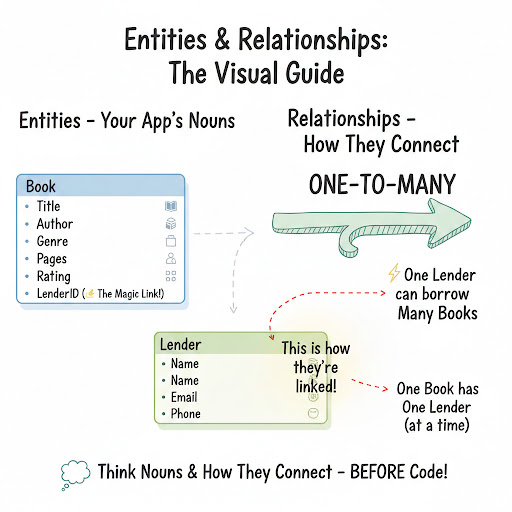
A single book can be lent to one person at a time (ideally!). And a single lender can borrow many books over time. This sounds like a classic "one-to-many" relationship.
- One
Lendercan be associated with ManyBooks(that they've borrowed). - One
Bookcan be associated with OneLender(at a given time).
To illustrate this, imagine you have a list of all your books, and for each book, you want to know who borrowed it. You wouldn't want to store the Lender's entire name and contact details inside every book record. That would be messy and inefficient.
Instead, you create a "link" or "relationship" between them. Typically, this means adding a special identifier (often called an "ID") from the Lender entity into the Book entity. So, your Book might have a field called LenderID.
This simple LenderID in the Book record is the invisible thread that connects them. When you want to know who borrowed a specific book, you look up the Lender using that LenderID.
Let's visualize this with a simple drawing:
The "Aha!" Moment: Why This Saves Your Sanity
My biggest mistake was thinking I could just "wing it." I'd build a UI, realize I needed a new piece of data, haphazardly shove it into an existing structure, and then wonder why everything felt clunky.
Here's why designing your database first, using entities and relationships, is a game-changer:
- Clarity and Structure: It forces you to think deeply about your app's core purpose and the information it needs. You get a clear map of your data before you start building.
- Prevents Redundancy: Instead of repeating information everywhere (e.g., typing a lender's name multiple times for different books), you store it once and link to it. This saves space and, more importantly, prevents inconsistencies.
- Flexibility for Growth: When you want to add new features (e.g., tracking genres, or even a wishlist), it's much easier to extend a well-structured database than to untangle a messy one.
- UI Design Becomes Easier: Once you know exactly what data you have and how it's connected, designing your UI becomes a direct reflection of that structure. If you know a
Bookhas aTitleand anAuthor, you immediately know you'll need input fields for those. If you know aBooklinks to aLender, you know you'll need a way to display or select that lender. The UI practically designs itself! - Less Rework, More Fun: This is the big one. Investing a little time upfront saves you hours of painful refactoring and debugging later. You spend less time fixing foundation issues and more time building exciting features.
A Simple Workflow to Get Started
You don't need fancy software. Grab a pen and paper, or open a simple drawing tool.
- List Your Nouns: Brainstorm all the key "things" your app will manage. These are your potential entities. (e.g.,
Book,Lender,Genre,User,Order,Product,Task,Project). - Define Attributes for Each Entity: For each noun, list all the pieces of information you need to store about it. Don't forget an
IDfor each one – a unique identifier like a serial number. (e.g.,Book:BookID,Title,Author,Pages,LenderID). - Draw the Connections (Relationships):
- For each pair of entities, ask: "How do these relate?"
- Is it one-to-one (rare in simple apps, e.g., one user has one profile)?
- Is it one-to-many (most common, e.g., one
Lenderhas manyBooks)? - Is it many-to-many (e.g., many
Bookscan have manyAuthorsif a book has co-authors)? If it's many-to-many, you'll usually need an extra "linking" entity in the middle. Don't overthink this for now; focus on one-to-many. - Draw lines between your entity boxes to represent these relationships. Add little notes like "1-to-Many" on the lines.
Here's another example with a slightly more complex scenario: a simple task management app.
- Entities:
User,Project,Task. - Attributes:
User:UserID,Name,EmailProject:ProjectID,Name,Description,UserID(the creator/owner)Task:TaskID,Description,DueDate,IsCompleted,ProjectID,AssignedUserID
- Relationships:
- One
Usercan create ManyProjects(1-to-Many:ProjecthasUserID). - One
Projectcan have ManyTasks(1-to-Many:TaskhasProjectID).
- One
One User can be assigned Many Tasks (1-to-Many: Task has AssignedUserID).
This visual roadmap is your blueprint. Once you have it, building the actual database (whether it's with a no-code tool, a simple spreadsheet, or a more traditional database) becomes a straightforward translation exercise. And when you finally get to the UI, you'll find that your screens naturally flow from the well-defined data you've already mapped out.
Whenever you start a new app, follow this checklist:
- What are the main “things” in this system?
- Can each thing exist independently?
- How do they connect?
- What are the real-world rules?
- Where is data being repeated?
- Can I simulate common scenarios successfully?
If you can answer these confidently, you’re designing properly.
Trust me on this one. My early scars taught me that rushing to the UI is a path to pain. Take a deep breath, think about your entities and their relationships, and lay that solid data foundation first. Your future self, and your users, will thank you for it.